Empowering Access: Tactile AAC Keyguards and High Contrast Symbols for Vision-Impaired Users (LAMP Words for Life iPad Guide)
Creating effective AAC solutions for vision-impaired individuals often requires more than standard setups. For many users, combining tactile AAC keyguards with high contrast AAC symbols can significantly improve access, accuracy, and communication outcomes—especially when using LAMP Words for Life on iPad.
In this guide, we explore a real AAC trial and show how custom AAC keyguards for iPad and high contrast symbol modifications can support both clients and speech pathologists working with complex communication needs.
Key Summary
- Custom AAC keyguards with tactile ridges improve access for vision-impaired users
- High contrast AAC symbols enhance visibility and reduce cognitive load
- LAMP Words for Life VI is not available on iPad, but modifications are possible
- Tools like Volksswitch Keyguard Designer enable precise customisation
- Collaboration with speech pathologists leads to better trial outcomes
- KimTech supports AAC trials, custom setups, and problem-solving solutions
AAC for Vision-Impaired Clients: Why Standard Setups Fall Short
Supporting AAC users with vision impairment presents unique challenges that standard AAC setups don’t always address:
- Low contrast symbols that are difficult to see
- Flat touchscreens with no tactile guidance
- Difficulty maintaining consistent motor planning
- Limited access to vision-optimised AAC apps on iPad
- Reduced accuracy and increased frustration during communication
For these clients, custom AAC solutions—including tactile keyguards and high contrast symbols—can make a significant difference.
Real Case Study: A Custom AAC Solution in Practice
This solution began with a speech pathologist enquiry about trialling LAMP Words for Life on iPad for a client with vision impairment.
The client required:
- Improved visual accessibility using high contrast AAC symbols
- A way to physically navigate the screen using tactile AAC keyguards
This wasn’t a standard setup—but it’s exactly the type of custom AAC trial solution we specialise in at KimTech.
Designing a Tactile AAC Keyguard for iPad
To support physical access, we designed a custom 3D printed AAC keyguard for iPad with tactile ridges.
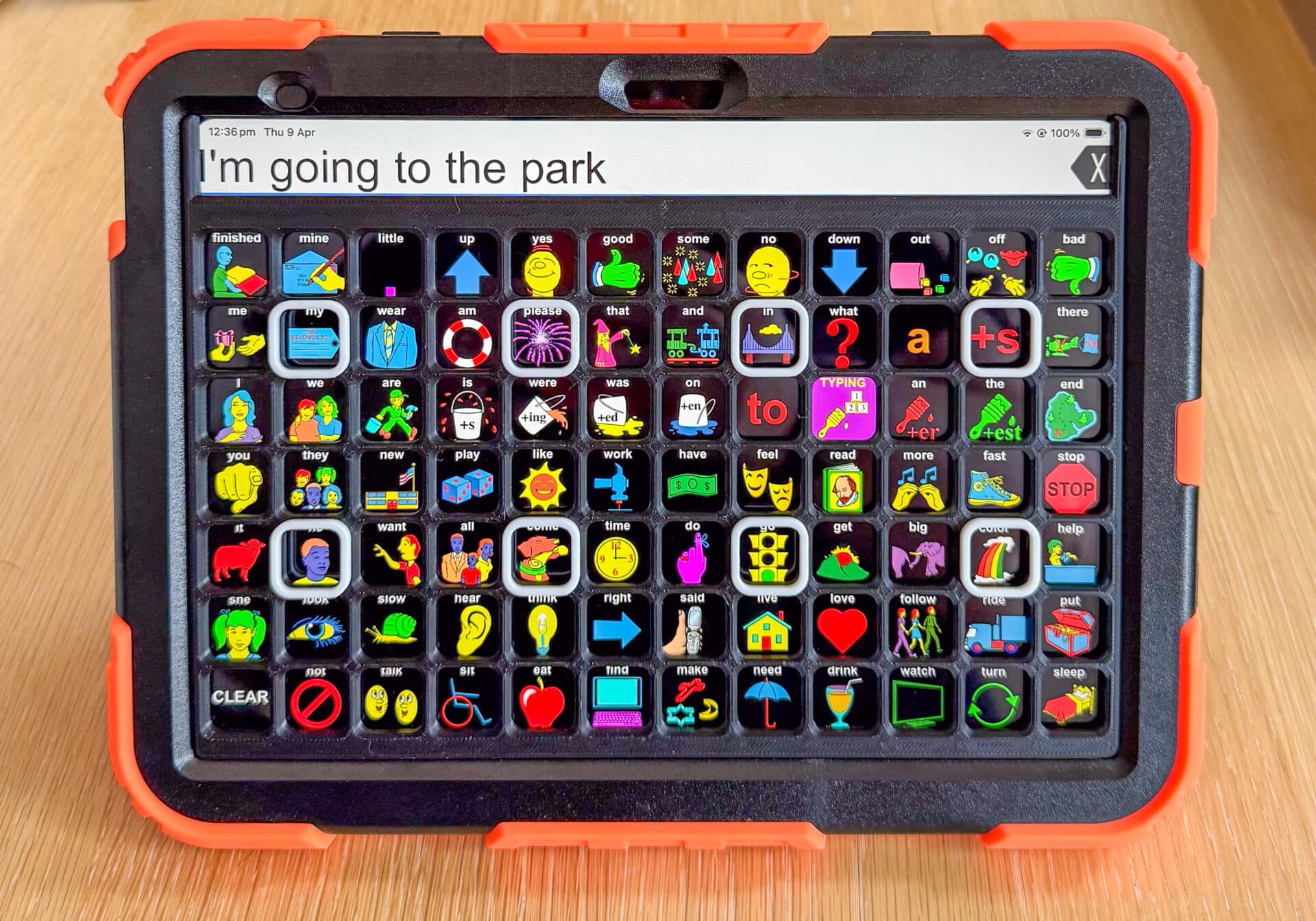
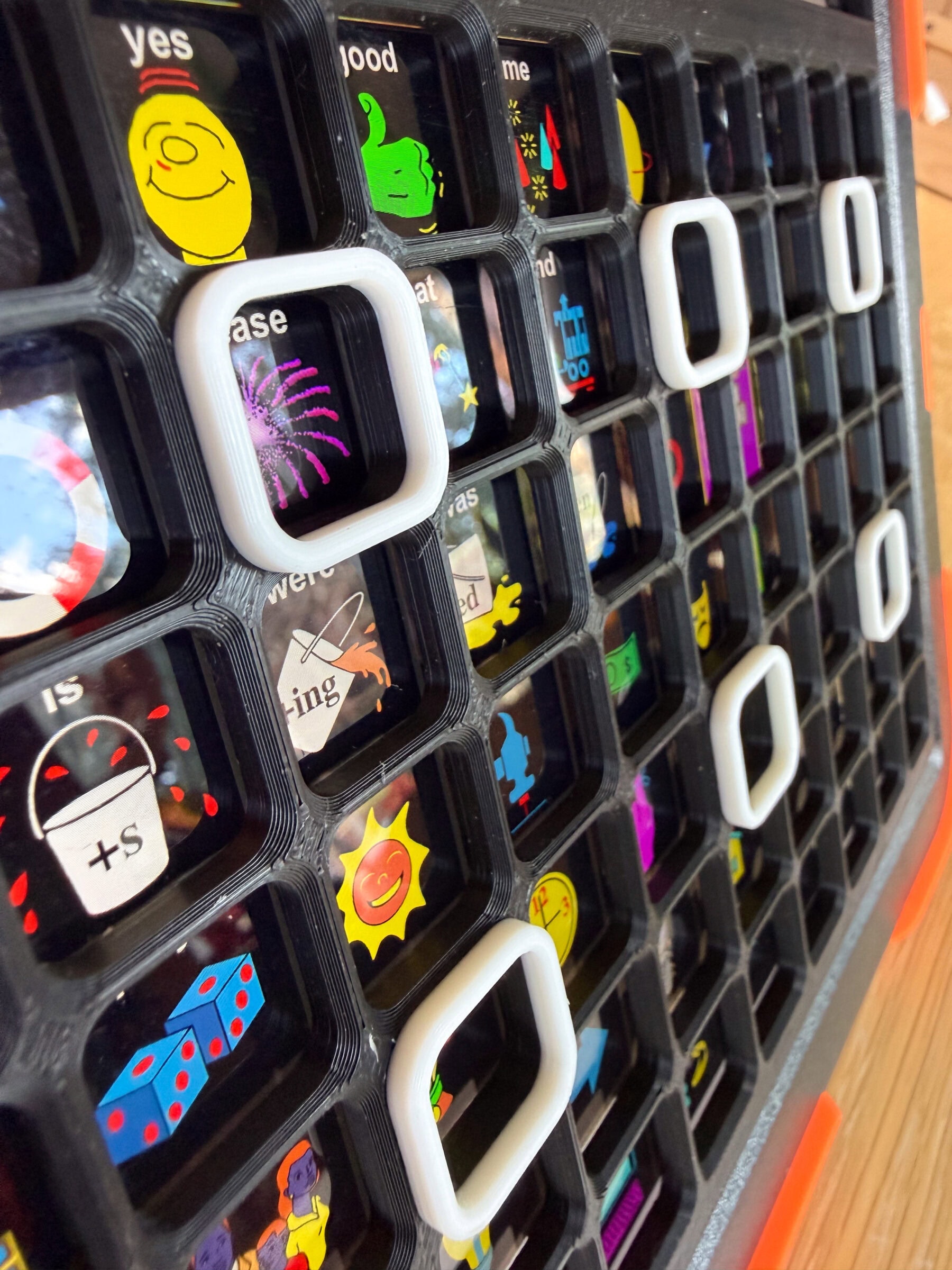
Using Volksswitch Keyguard Designer, we were able to:
- Match the keyguard to the LAMP Words for Life layout
- Add raised tactile ridges for navigation and accuracy
- Create a solution tailored to the client’s vision and motor needs
👉 Explore Volksswitch's Keyguard Designer
Benefits of tactile AAC keyguards:
- Enhance confidence during AAC use
- Improve button targeting and accuracy
- Provide physical boundaries for screen navigation
- Support users with low vision or motor challenges
Using High Contrast Symbols in LAMP Words for Life (iPad)
The official LAMP Words for Life Vision Impaired (VI) version is only available on Accent devices—not iPads.
However, high contrast AAC symbol modifications for iPad provide an effective alternative.
Customising AAC apps with high contrast symbols
Speech pathologist Angela Moorad (OMazing Kids AAC Consulting) has developed:
- High contrast symbol sets for LAMP Words for Life
- Modifications for apps like GoTalk Now
- Strategies for improving accessibility in AAC apps
These modifications allow clinicians to:
- Improve symbol visibility
- Reduce visual fatigue
- Maintain consistent motor planning
- Adapt AAC systems to individual needs
👉 Access Angela Moorad's webinar and resources
Common Challenges with AAC for Vision-Impaired Users
When supporting clients with low vision, speech pathologists often encounter:
- AAC apps not designed for visual impairment
- Difficulty maintaining consistent layouts across devices
- Limited awareness of customisation options
- Time constraints in modifying vocabulary systems
- Lack of trial equipment for testing solutions
This is where trial services and custom solutions become essential.
The Importance of AAC Trials and Custom Solutions
AAC trials are essential when working with complex needs, particularly for vision-impaired clients using AAC devices.
They allow you to:
- Test different access methods (visual vs tactile)
- Trial custom keyguards and AAC setups
- Collect functional data for NDIS reports
- Identify the most effective communication system
At KimTech, we support AAC trials across Australia, helping therapists gather the evidence needed for successful outcomes.
How KimTech Supports AAC Trials, Keyguards and NDIS Funding
KimTech Communication Assistive Technology provides:
- AAC device trials (iPad + multiple AAC apps)
- Custom 3D printed AAC keyguards (including tactile designs)
- Setup and configuration of AAC apps
- Guidance on NDIS funding pathways
- Problem-solving for complex communication needs
Whether it’s adapting an iPad setup or designing something entirely new, our focus is always on practical, individualised solutions.
FAQ
-
What is a tactile keyguard?
 Clinical Expert
Kim Magee
B.App.Sc. (Speech Path) | 30+ Years Experience
Kim is a clinical expert with 30 years of experience in the disability sector. Formerly the manager of ComTEC, the ILC, and Yooralla’s AT services, she specialises in bespoke 3D-printed solutions and AAC device trials for the NDIS community.
A tactile AAC keyguard is a physical overlay placed over a tablet screen with raised borders or ridges. It helps users accurately locate and select buttons, especially those with vision impairment or motor challenges.
-
Can LAMP Words for Life VI be used on an iPad?
The official Vision Impaired version is only available on Accent devices. However, high contrast symbol modifications can be implemented on iPad versions using external resources.
-
Are high contrast symbols only for vision-impaired users?
No. High contrast symbols can benefit a wide range of users, including those with cognitive or sensory processing challenges.
-
Can KimTech create custom keyguards for different AAC apps?
Yes. Keyguards can be customised for a variety of AAC apps, grid sizes, and individual access needs.
-
Who can access KimTech services?
We work with speech pathologists, families, educators, and support teams across Australia.
Conclusion
For AAC users with vision impairment, small adjustments like tactile AAC keyguards and high contrast symbols can dramatically improve access and communication outcomes.
By combining:
- Custom hardware (keyguards)
- Software modifications (high contrast AAC symbols)
- Collaborative AAC trials
…it’s possible to create truly individualised AAC solutions.
Ready to Trial a Custom AAC Solution?
Ready to Trial a Custom AAC Solution?
If you're a speech pathologist, therapist, or family member looking for:
- AAC trials in Australia
- Custom AAC keyguards for iPad
- Guidance with NDIS funding for AAC
👉 Get in touch with KimTech to discuss your client’s needs and trial options.
This guide is written by KimTech Communication Assistive Technology, a speech pathologist-led service specialising in AAC trials, custom keyguards, and assistive technology solutions across Australia.